
Not having conio.h on the Amiga is a pain. So let’s make one, or at least something like it!
Play it in your browser
The retro-c dungeon is wired up as a preset in our in-browser Amiga 500 (AROS) IDE. The preset now runs the v2 adapter from the next post, with its own screen, colour and one-key input, so it’s where this v1 story ends up. No SDK install, no Kickstart fiddling:
If you are not already following along, this post is the Amiga half of a pair. Why and how we got here story is in the combined intro post: A “Not Conio But Compatible” Adapter for vbcc (shared theory)
There’s also the Atari ST side to check out.
What follows is everything that’s specifically Amiga about this plus the three big rakes I stepped on.
Rake 1: dos.library is right there, until it isn’t
This game is not demanding, we just need to read the keyboard a key at a time, without waiting for enter/return to be pressed. Simple, just switch the input stream to RAW mode via dos.library:
#include
BPTR in = Input();
SetMode(in, DOSTRUE);
Compiled! But then the linker:
Error 21: Reference to undefined symbol _Input.
Error 21: Reference to undefined symbol _SetMode.
Error 21: Reference to undefined symbol _WaitForChar.
Error 21: Reference to undefined symbol _Read.
Error 21: Reference to undefined symbol _Delay.
Error 21: Reference to undefined symbol _DateStamp.
vbcc’s proto/dos.h is meant to inline calls to dos.library so you don’t need to link amiga.lib at all. On this particular vbcc setup the inlines didn’t kick in, and there’s no -lamiga in the IDE’s vbcc command, so each dos call became an undefined extern.
D’oh!
For now we stay inside libc, meaning the player has to press a key and Enter to make a move. For a turn-based dungeon that’s annoying so it can’t stay like this, we will have to bring raw input back.
Rake 2: accidental invisibility
With dos.library out, the adapter changes to “ANSI escape codes via printf“.
The Amiga shell window opened. The dungeon drew. I couldn’t see anything.
Turns out that AROS Shell paints the window in its default Workbench colours: pen 0 = grey background, pen 1 = grey text.
Our printf("\033[2J") cleared the screen, but the colour codes we then sent did nothing because AmigaOS’s CSI implementation maps \033[30..37m to console pens 0..7, not to standard ANSI colours. \033[30m is “use pen 0” (the background pen, invisible). \033[37m is “use pen 7”, which may not even be defined in a standard shell.
Worse, \033[40m (set background to black in ANSI) isn’t honoured at all by the default AROS shell. The window background stays grey no matter what you send.
The fix was to drop colour. Ugh!
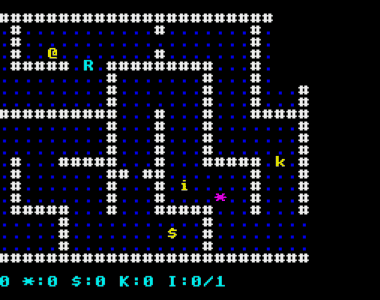
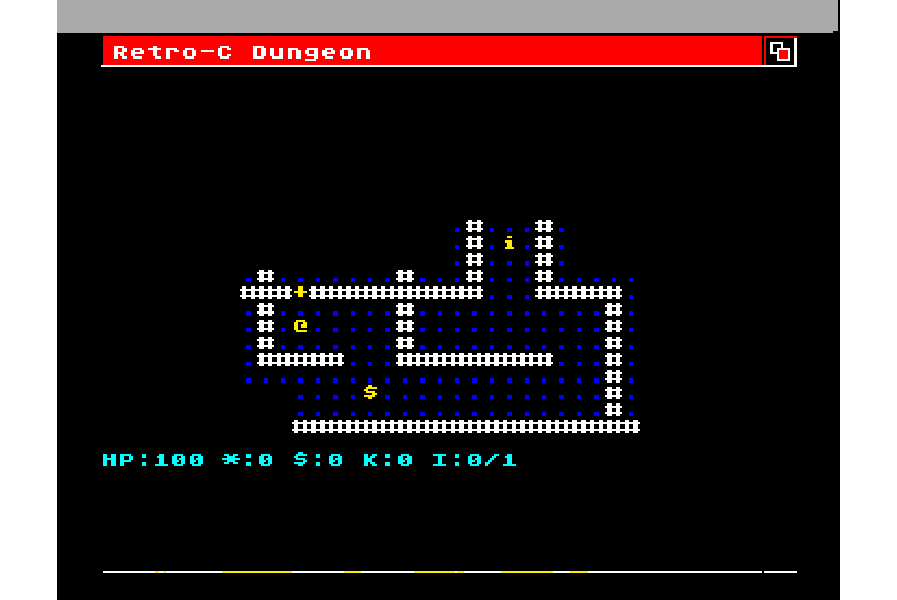
Print every glyph in the default pen (pen 1). The dungeon becomes monochrome. Foes, items, and walls all read the same colour.
Rake 3: refresh rates measured in minutes
With the grey “fixed”, the dungeon finally started rendering.
Very, very slowly.
It looked like an early modem session, which is retro but not the goal.
The cause was each glyph went through three calls and a flush:
printf("\033[%u;%uH", y+1, x+1);   /* move cursor */
printf("\033[%um",    colour);     /* set colour   */
putchar(glyph);                    /* emit glyph   */
fflush(stdout);                    /* push out now */
AROS `CON:` parses every byte of every CSI sequence (Control Sequence Introducer, i.e. Escape Sequence). Multiply by every cell in a dungeon redraw and you have a painful 300-baud feel.
The fix is to make the three calls into one printf, dropping the per-cell flush:
void plat_putc(uint8_t x, uint8_t y, glyph_t g, uint8_t colour) {
    (void)colour;
    printf("\033[%u;%uH%c", (unsigned)(y+1), (unsigned)(x+1), glyph_native[g]);
}
plat_puts keeps a flush because it runs at frame boundaries (status line, title) and we want the player to see those promptly. The result is night and day faster, whew!
Hacky dos-free fill-ins
With dos.library off the table, the adapter needs three more things from libc:
plat_delay_msbecomes a busy-wait NOP loop tuned for a 7 MHz 68000. Unscientific, but a turn-based game doesn’t care.plat_seed_randcallstime(NULL)for a variable seed.plat_key_pressedreturnsK_NONEalways, because there’s no non-blocking peek withoutWaitForChar. The game’s attract-mode animations run to completion instead of being interruptible.
None of these are great, but they’re correct enough for now.
ANSI escape sequences we use
| What we want | ANSI / CSI sequence |
|---|---|
| Clear screen + home | ESC [ 2 J ESC [ H |
| Cursor to (col, row) | ESC [ row+1 ; col+1 H (1-based) |
| Foreground colour | ESC [ Nm with N in 30..37 |
| Background colour | ESC [ Nm with N in 40..47 |
| Reset all attributes | ESC [ 0 m |
| Cursor off / on | ESC [ ESC space p / ESC [ 0 ; 0 ESC space p |
The colour codes are the standard ANSI SGR set: 30 black, 31 red, 32 green, 33 yellow, 34 blue, 35 magenta, 36 cyan, 37 white. Background is the same set plus ten. AmigaOS’s interpretation is faithful enough that the same codes work in modern xterm too, which is handy for desktop dev.
The adapter follows the same five-section layout as its Atari ST sibling. See the shared theory post for the full platform.h contract these implementations satisfy.
The v1 Amiga adapter
If you go look up platform/plat_amiga.c in retro-c you will see it is now the v2 adapter from the next post, and the v1 file didn’t survive (it was banished). Everything presented here is libc only, no dos.library anywhere.
Glyph table
static const uint8_t glyph_native[G_COUNT] = {
    '.','#','+','@','E','$','!','/','>','%', ' ','*', 'h','*','i', '*', 'k','-',
    'G','R','T','&'
};
The game refers to glyphs by symbolic IDs (G_WALL, G_PLAYER, G_GOBLIN). The adapter maps each ID to the ASCII character we want to draw. AmigaOS uses standard ASCII for the printable range so the table is the same as on the BBC, the Apple II, the mac/windows/linux build, and the Atari ST.
Init and shutdown
void plat_init(void) {
    fputs("\033[2J\033[H", stdout);   /* clear screen + home */
    fputs("\033[ p",       stdout);   /* cursor off */
    fflush(stdout);
}

void plat_shutdown(void) {
    fputs("\033[0;0 p", stdout);                 /* cursor on */
    fputs("\033[0m\033[2J\033[H", stdout);
    fflush(stdout);
}
Clear the screen and hide the cursor on the way in, put the cursor back and clear up on the way out, so the player is left with a clean shell. There’s no raw mode to switch on, because that needs dos.library (Rake 1).
Drawing a glyph
void plat_putc(uint8_t x, uint8_t y, glyph_t g, uint8_t colour) {
    (void)colour;
    printf("\033[%u;%uH%c", (unsigned)(y+1), (unsigned)(x+1), glyph_native[g]);
}

void plat_puts(uint8_t x, uint8_t y, const char *s, uint8_t colour) {
    (void)colour;
    printf("\033[%u;%uH%s", (unsigned)(y+1), (unsigned)(x+1), s);
    fflush(stdout);
}
This is the Rake 3 version. One printf moves the cursor and prints the glyph in a single call, and colour is ignored because v1 draws everything in the shell’s default pen (Rake 2). plat_puts is the only place that flushes, since it draws the status line and titles at the end of a frame, and that’s when the player needs to see the result.
Reading the keyboard
uint8_t plat_key_wait(void) {
    int c;
    do {
        c = getchar();                  /* returns once Enter is pressed */
    } while (c == '\n');                /* skip the Enter itself */
    switch (c) {
        case 'w': case 'W': return K_UP;
        case 's': case 'S': return K_DOWN;
        case 'a': case 'A': return K_LEFT;
        case 'd': case 'D': return K_RIGHT;
        case ' ': case 'z': case 'Z': return K_FIRE;
        case 'q': case 'Q': case EOF: return K_QUIT;
    }
    return K_OTHER;
}

uint8_t plat_key_pressed(void) {
    return K_NONE;                      /* no peek without WaitForChar */
}
getchar() only gives anything back after the shell has a whole line, which is where the “press a key, then Enter” comes from. A handy side effect is that typing ddd then Enter walks three squares, because the loop reads the buffered letters one at a time. Arrow keys are left alone in this version. WASD covers movement, and decoding escape sequences properly needs raw mode anyway.
Timing and randomness
void plat_delay_ms(uint16_t ms) {
    volatile uint16_t n;
    while (ms--)
        for (n = 0; n < 150; n++)       /* rough guess for a 7 MHz 68000 */
            ;
}

void plat_seed_rand(uint16_t seed) {
    srand(seed ^ (unsigned)time(NULL));
}
Without Delay() the only way to wait is to burn cycles. The loop count is a guess, and it’ll run at different speeds on an accelerated Amiga or a fast emulator, but the game only uses delays for attract-mode pacing, so nobody gets hurt. time(NULL) comes from libc and changes every second, which is enough to give a different dungeon on each run.
What v2 needs
All three compromises go away once dos.library links.
#include
#include

BPTR in = Input();          /* current input handle */
SetMode(in, DOSTRUE);       /* switch CON: to RAW mode, no line buffering */
After SetMode(in, DOSTRUE) each Read(in, &c, 1) returns one byte the moment it arrives. WaitForChar(in, 0) is the non-blocking peek, returning non-zero if a byte is already waiting. Arrow keys then arrive as ANSI CSI sequences (ESC [ A for up, B down, C right, D left), so the key reader would look like this:
uint8_t plat_key_wait(void) {
    unsigned char c = 0;
    if (Read(input_fh, &c, 1) != 1) return K_NONE;
    if (c == 27) {                       /* ESC: maybe an arrow */
        unsigned char b = 0, k = 0;
        if (WaitForChar(input_fh, 5000L) && Read(input_fh, &b, 1) == 1 && b == '[') {
            if (WaitForChar(input_fh, 5000L) && Read(input_fh, &k, 1) == 1) {
                switch (k) {
                    case 'A': return K_UP;
                    case 'B': return K_DOWN;
                    case 'C': return K_RIGHT;
                    case 'D': return K_LEFT;
                }
            }
        }
        return K_QUIT;                   /* bare ESC */
    }
    /* ... letters, space, return ... */
}
If the first byte is ESC, peek for [, then read the final letter. The two WaitForChar(in, 5000L) calls wait up to 5000 microseconds each for the next byte, so a bare ESC press counts as “quit” rather than blocking forever. It’s the same shape you’d write in a Linux ncurses program, just with dos.library names.
For timing, Delay(ticks) blocks for a number of 1/50 second ticks on PAL (1/60 on NTSC), which beats a busy loop on any speed of machine. For seeding, DateStamp() gives the date and time down to the tick.
As it turned out, v2 went further than this. It reads keys from its own window through Intuition instead. Intuition is AmigaOS’s windowing system, which sends every keypress straight to our own window instead of making us wait for the Shell to deliver a whole line.
Bundling the lot for the in-browser IDE
The RGC IDE prefers a single source file per preset but our game is split across game/main.c, game/map.c, game/entity.c, plus the adapter. To turn that into one file we run a script that concatenates the relevant .h and .c files, deduplicates the
Of course this is a kludgey way to build code so I need to work on the IDE some more to have “grown up” project files, similar to the TRSE implementation.
Where this fits in the roguelike
This is the post where the multi-platform roguelike gains its first real 16-bit Amiga build. Same game source as the C64, the Apple II, the BBC. Just a different adapter library beneath it. The Atari ST also gets a matching treatment in its part 5 post.
Next up
If you haven’t already seen, the Atari ST post covers the ST-flavoured side.
Next (Amiga-only): we ditch CON: and do things a better way!
Original article by retrogamecoders.com