Ever wanted to write a quick script or utility for your Windows, Mac, or Linux computer and wished you could just use your familiar BASIC instead of Python, BASH, C, Golang, or NodeJS?
I’ve been working on a small project called CBM-BASIC, a Commodore BASIC–style interpreter written in C.
It’s inspired by the BASIC you’d find on machines like the C64, but it runs in the terminal as a normal program for your modern computer.
Just to set expectations early:
- this is not an emulator
- in fact, it doesn’t simulate hardware at all
- no attempt has been made to be identical to Commodore V2 (eg. commands have been added and C64
POKEs don’t work on your PC) - it just runs BASIC (with some modern conveniences added)
That turns out to be more fun and useful than it sounds.
How it Started
This started as an experiment based on a BASIC project by David Plummer (check his video below, it’s worth a watch).
From there I kept extending it, mostly because it was fun. But at some point it crossed over into something I also found practical:
- read and write real file system files
- work with standard input and output
- supports command line arguments
- you can code non-trivial BASIC programs
- execute system commands and launch applications
At that point it stopped being a demo and became something I actually use in day-to-day life.
Using CBM-BASIC
Download and extract the .Zip file for your system. There are executables for Windows, Mac, and Linux. If you need/prefer, you should also be able to compile using the source code for other systems too.
Then create a text file called hello.bas and run it as a BASIC program directly from your terminal:
./basic hello.bas10 PRINT "HELLO, WORLD!"
20 ENDThat’s a trivial example, but you can also refer to the interpreter and create shell scripts if you do this:
#!/Users/chrisg/github/cbm-basic/basic
A$="abcdefghijklmnopq"
print right$(a$,5)
print left$(a$,5)
Once the .bas file is given executable permissions, eg. chmod +x script.bas you can execute it just the same as any shell script or batch file, like so:
./script.bas
BASIC as a scripting language – Not Just “Retro BASIC”
This keeps the cozy feel of Commodore BASIC, but adds just enough to make it actually practical for a modern system.
You can also pipe data in and out:
echo 42 | ./basic program.bas10 INPUT A
20 PRINT A*2Command-line Arguments and Launching Programs:
ARGC()andARG$(n)are used for command line argumentsSYSTEM()to run shell commands and receive error codes backEXEC$()to capture resulting string command output
So you can do things like:
10 U$ = EXEC$("whoami")
20 PRINT "HELLO ";U$
That’s not very 1980s, but it is very handy. Take a look at my script that helps me manage my Github repositories:
5 REM Delete a git tag vX.Y.Z locally and on origin
10 IF ARGC() <> 1 THEN GOTO 40
20 VER$ = ARG$(1)
30 GOTO 70
40 PRINT "Usage: delete-tag.bas "
50 PRINT "Example: delete-tag.bas 1.1.3"
60 END
70 TAG$ = "v" + VER$
80 PRINT "Deleting local tag "; TAG$
90 CMD$ = "git tag -d " + TAG$
100 RC = SYSTEM(CMD$)
110 PRINT "SYSTEM returned "; RC
120 PRINT "Deleting remote tag "; TAG$
130 CMD$ = "git push origin --delete " + TAG$
140 RC = SYSTEM(CMD$)
150 PRINT "SYSTEM returned "; RC
(Yes, it uses GOTO – OH NO!)
If you supply no arguments it tells you how to execute the program. When you do pass an argument it concatenates the string to pass to Github as the tag to delete and checks the response back from the git command to see if it worked.
How about an example of using cURL to get the current time in London using an internet time server:
e$ = "curl -s -f 'https://timeapi.io/api/timezone/zone?TIMEZONE=EUROPE/LONDON'"
r$ = EXEC$(e$)
ft$ = MID$(r$, instr(r$, "currentLocalTime")+19, 19)
d$ = LEFT$(ft$, 10)
t$ = MID$(ft$, 12, 8)
print "": print "The current date and time in London is: {white}{reverse on}";
print d$ + "{reverse off} {reverse on}" + t$ + "{reverse off}"
print ""
Working with Your File System
You can read and write files on your actual filesystem:
10 OPEN 1,1,1,"test.txt"
20 PRINT#1,"HELLO FILE"
30 CLOSE 1
It behaves like classic BASIC, just without the tape or 1541 5 1/4″ disk loading delays.
Structured Programming & Keeping BASIC Readable
You can write line-numbered programs and use GOTO, mainly for where you have existing code, but you’re not forced to.
Instead, you get:
- named labels
- longer variable names (with first two characters being significant, ala CBM-style behaviour)
- arrays and multi-dimensional data
- structured flow with
IF,FOR,GOSUB
So it still feels like BASIC, just a bit easier to live with.
PETSCII (without the mess-cii)
Instead of this:
PRINT CHR$(147);"HELLO";CHR$(28);"WORLD"You can also write:
PRINT "{CLR}HELLO {RED}WORLD"Those {TOKENS} are expanded at load time into the equivalent CHR$() calls, so the program behaves the same but stays readable
You can also instead use the added COLOR and BACKGROUND commands to use the numbered colours if you like.
TEXTAT/LOCATE (Simple Screen Control)
You can position text and build simple text UIs:
LOCATE 10,5
PRINT "HELLO"
TEXTAT 0,0,"SCORE: " + STR$(S)With colour support mapped onto the command console, it’s enough to build terminal-based games and tools without needing a full graphics system.
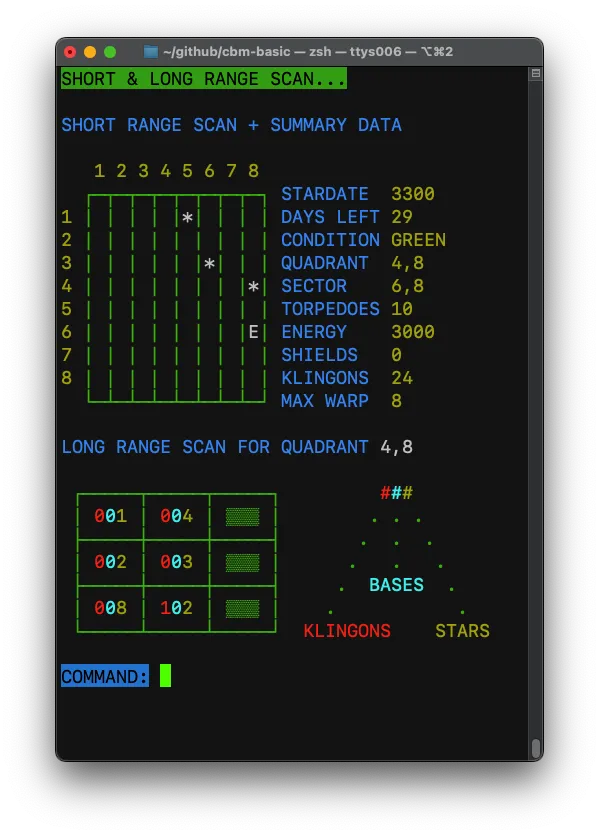
Example: Star Trek
One of the included examples is a port of the classic Star Trek game ported from the conversion created by Electron Greg. It’s a good test because it exercises quite a lot of the interpreter:
- input handling
- arrays
- control flow
- screen output
- etc
Run it like this:
./basic -petscii examples/trek.basUsing -petscii helps a lot here, as it maps colours and control codes so things look closer to a period-appropriate machine.
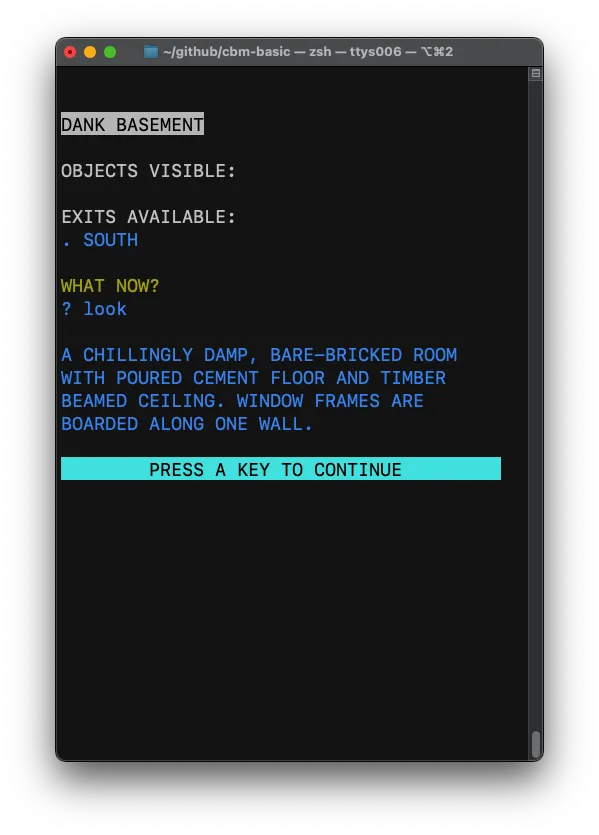
Example: A Cross-Platform Text Adventure
Another nice use case is text adventures as they are, as the name suggests, text-based.
If you’ve followed my earlier guide about text adventure programming you’ll recognise the structure straight away.
Here’s a very cut-down idea of what I mean:
10 PRINT "YOU ARE IN A ROOM"
20 INPUT A$
30 IF A$="LOOK" THEN PRINT "THERE IS A DOOR"
40 IF A$="GO" THEN PRINT "YOU LEAVE"
The version I’ve included in the download builds on that into something more structured. It’s enough foundation to build a real game and is an idea for where you can take this:
- write a game once
- run it on Windows, macOS, Linux
- keep it close to classic BASIC but with modern performance
It’s a simple framework for building something bigger without needing any complex tools or an emulator.
Who This Is For
This is clearly not for everyone (as the negative reaction from some purists and BASIC-haters already proved) but will probably make sense if you:
- enjoy programming in BASIC and want a modern way to use it
- are building retro-style projects
- want a lightweight scripting alternative to BASH
- like experimenting with interpreters or languages (the C code is all there for you to analyse or expand)
Remember this isn’t about recreating the C64 – If you want full hardware “cycle” accuracy and C64 memory map, an emulator is still the right tool.
What’s Next
Phase one of this project was making it useful. Phase two is making it better for games.
On the to-do list:
- more accurate PETSCII representation
- improved visual output (possibly bitmap-style)
- sound support
- more game-oriented features
Longer term, I’d like to explore compiling to WebAssembly/JavaScript, so BASIC programs can run directly in the browser as well as the terminal.
Write once, run anywhere, but still programmed in BASIC.
Try It Yourself
You can grab releases or the source code here:
https://github.com/omiq/cbm-basic
Then run one of the examples:
./basic -petscii examples/trek.basOr even more fun, try your own programs!
Credits
The original idea was based on a BASIC project by David Plummer:
Original article by retrogamecoders.com