May 8, 2025#130 Hardware
MouSTer and OpCoders Store
This marks my first blog entry of 2025. It’s been a while, but there’s been plenty happening!
The “What’s New!” page has been available since the release of C64 OS v1.04 in June 2023. It effectively replaced blog posts for short news updates. While I’m here communicating casually, the What’s New! page provides concise updates on recent software releases and announcements, adopting a more promotional tone.
Additionally, the welcome page has undergone a refreshing redesign, featuring a dynamic header section that highlights new announcements. Currently, it showcases information on:
That last topic is the focus of this blog post.
C64OS.com has transformed significantly over the years. Back in 2017, when I created the site, it was just a single page. Now, it’s expanded into a comprehensive website, the largest I’ve ever managed, even surpassing those for previous companies I’ve been associated with.
Initially, the top five tabs were: Welcome, Weblog, Buyer’s Guide, C64 OS, and C64 Lug. The C64 Lug tab was dedicated to my C64 Luggable project, which I cherish and take to events like World of Commodore. While that project isn’t abandoned, I’m not actively building it anymore, so you can find the related pages through the middle of the welcome page instead of the top navigation.
In its place, I’ve introduced a new top section: the OpCoders Store.
OpCoders Store – Site section
This year, I’ve expanded beyond just selling C64 OS. The OpCoders Store now features a proper shopping cart, allowing you to add multiple items, adjust quantities, and remove items before checkout.
This enhancement significantly improves the shopping experience, enabling me to offer a wider array of products, which I’m thrilled about.
I first introduced some “Goodies and Extras,” including a high-quality iron-on featuring the humorous 6502 CPU promotional graphic styled like Apple’s promotions for the M1 and M2 processors.
After I shared this on Twitter in 2022, it became my most retweeted tweet with 483 retweets and over 234,000 views.
I got inspired by #WWDC22. #C64 #6502CPU #RetroComputing #atari What do you think? pic.twitter.com/KZgIYQin4f
— Gregorio Naçu (@gregnacu) June 10, 2022
This fantastic infographic is now available for purchase as an iron-on, allowing you to apply it to various surfaces, from T-shirts to gym bags. By avoiding the complexities of maintaining stock for multiple styles, sizes, and colors, the iron-on option simplifies the process.
6502 CPU Promo Graphic, Iron-On.
Each section of the graphic is separate; if applied to a colored T-shirt, that color will show through the individual sections. The full graphic measures 6″ wide by 3.3″ high.
Below, the examples on the left are not ironed on; they simply depict potential placements. On the right, my lovely wife shows off her enthusiasm for all things C64 by wearing it!
Order now for just $5 CAD.
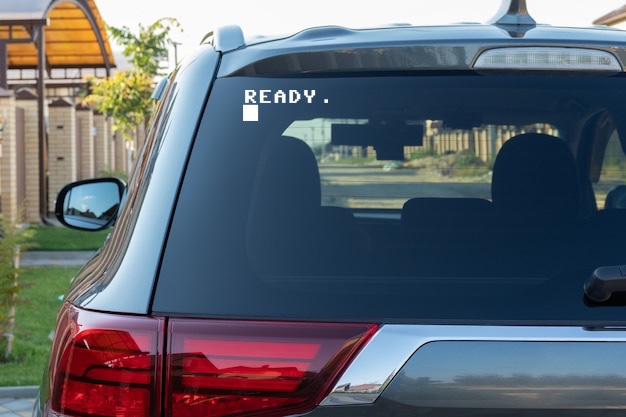
Another popular item is the white vinyl “READY.” decal for your windows.
The gradient background in the image helps to illustrate the white letters, which would blend into a white background otherwise. Each letter and mark is a separate piece of vinyl, pre-aligned for easy application.
To apply it, simply clean and dry your window, peel off the backing, position the decal, and rub it into place. As you slowly lift the backing, the letters and marks adhere perfectly.
White vinyl READY. decal
It looks fantastic on the back of a car window! I previously had a “READY.” decal on my old car and now have a “LOAD ‘*’,8,1 READY. RUN.” one on my new vehicle. I decided to include the READY. version in the OpCoders Store because it’s compact enough to fit alongside a C64 OS User’s Guide.
READY. decal on rear windshield of car
Measuring 8″ wide by 3″ high, this mock-up may not reflect the actual size on a car window. Regardless, these decals are an excellent way to spread the nostalgia of retro computing throughout your community.
Order now for just $8 CAD.
Recently, I’ve ventured into selling hardware, beginning with mouSTer for a few key reasons:
- It’s compact and easy to ship.
- It pairs well with C64 OS.
- It has broad appeal across multiple platforms.
If you’re unfamiliar, mouSTer is a compact adapter housed in a sleek black 3D printed case. It features a DE-9 connector on one side and a USB-A port on the other.
The DE-9 connector is commonly found on retro computers and game systems for input devices, including various Commodore 8-bit machines, Atari systems, Amigas, and more, using the Kempston Interface.
With mouSTer, you can connect modern USB mice, joysticks, and game controllers to these classic systems. It’s also fully customizable and upgradable via its USB port.
mouSTer adapter seen from both angles
Priced at $55 CAD, mouSTer offers a competitive option. Additionally, OpCoders is running a special bundle deal—purchase the C64 OS v1.07 Standard Bundle with a mouSTer and enjoy a 15% discount on the mouSTer. Such deals are hard to come by!
Order mouSTer now for just $55 CAD.
Order C64 OS + mouSTer now for only $110 CAD.
This means C64 OS is priced at $64 (the regular price) while mouSTer is just $46 CAD.
mouSTer via OpCoders
When you order mouSTer from the OpCoders Store, you receive some valuable bonuses. I’ve created a comprehensive User’s Guide that details everything you need to know about compatible systems, LED blink patterns, configuration, and firmware updates. The guide also provides settings tailored for use with a C64 and C64 OS.
The guide simplifies the instructions, enhancing your confidence for first-time use.
mouSTer and User’s Guide
mouSTer ships directly from Canada, pre-configured for use with various C64 systems (breadbin, C64c, SX-64, Ultimate64, or compatible reproductions) and C128 models (flat, C128D, or compatible reproductions). This ensures it can be used immediately with USB mice in C64 OS.
Updating Settings and Firmware
While mouSTer is pre-set as a 1351 mouse adapter for the Commodore 64, it offers much more functionality, and configuring it is a breeze.
- Connect mouSTer to a compatible computer’s control port.
- Insert a USB flash drive into mouSTer’s USB port.
- Power on the computer.
- mouSTer will create a settings folder on the drive.
- Transfer the USB drive to a Mac or PC.
- Edit the settings file in a text editor.
- Return the USB drive to mouSTer.
- Replace the USB drive with your USB mouse, joystick, or controller.
Updating firmware is just as straightforward. Store the new firmware in the mouster folder on your USB key via a Mac or PC. Turn off the connected computer, plug the USB key into mouSTer, and switch the computer back on. mouSTer automatically updates its firmware.
Configuration options are extensive, supporting various systems including:
Commodore 8-bit
- VIC-20
- C64
- C64c
- SX-64
- Ultimate64
- C128
- C128D
Commodore Amiga
- Amiga 500
- Amiga 600
- Amiga 1200
- Amiga 1000
- Amiga 2000
- Amiga 3000
- Amiga 4000
- Amiga CD32
Atari
- Atari 2600
- Atari VCS*
- Atari 400
- Atari 800
- Atari XL
- Atari XE
- Atari 260ST
- Atari 520ST
- Atari 1040ST(e)
- Atari Falcon
ZX Spectrum
- ZX Spectrum with Kempston Interface
mouSTer and C64 OS — a perfect synergy.
In C64/128 mouse mode, mouSTer emulates a 1351 mouse, now supporting the MicroMys mouse wheel protocol. This is deeply integrated into C64 OS.
Mouse Utility in C64 OS
The Mouse Utility offers options to customize mouse wheel direction—mimicking either Windows’ classic style or macOS’s default behavior. You can even adjust scrolling speeds here.
Additionally, mouse tracking sensitivity can be fine-tuned in the Mouse Utility. If you’re using a high-resolution USB mouse that moves too quickly, adjusting the microstep in mouSTer’s settings can help stabilize it.
With mouSTer and a USB mouse, you can easily scroll through directories in the File Manager, navigate help content in the Help Utility, browse Wikipedia articles, or scroll through image search results.
mouSTer significantly transforms the C64 OS experience, being the first-known Commodore 64 software to support mouse scrolling.
Visit Store Order mouSTerOriginal article by www.c64os.com