RGC-BASIC has reached Version 2 already – I didn’t intend to attempt to build a BASIC language game engine but it’s getting close to being that anyway!
When I shipped RGC-BASIC 1.11 it was cautiously intended as a “Sound MVP” upgrade to the previous RGC-BASIC foundation: one-shot WAV playback, single-voice, strictly the minimum I could justify calling a release.
That was meant to be the whole sound story for a while. Then I happened across a website that played a 100 KB Amiga tracker module, and I thought “wouldn’t it be nice if…“, and by the time I resurfaced I’d rewritten large parts of an updated graphics pipeline as well.
So this is version 2, or 2.1 if we are going to be technical about it (which we are):
- Streaming tracker music (MOD / XM / S3M / IT / OGG / MP3),
- a proper set of screen modes including 640×400 true-colour,
- alpha-composited off-screen bitmaps,
- a 256-entry live palette with demo-style rotation,
- per-zone and per-scanline scrolling,
- and enough polish to justify bumping the major version.
Try any of it in the online IDE. Every demo linked below runs directly in the browser with no installs needed.
Streaming Tracker Music
LOADMUSIC slot, "song.mod"          ' MOD / XM / S3M / IT / OGG / MP3
PLAYMUSIC slot                      ' start or restart
STOPMUSIC slot                      ' rewind + stop
PAUSEMUSIC slot / RESUMEMUSIC slot
MUSICVOLUME slot, 0.0 - 1.0
MUSICLOOP slot, 0 | 1
UNLOADMUSIC slot
At first, sounds were one-shot WAV samples. 2.0 adds a parallel pool for streamed tracker music, with its own verbs and its own slot space. Raylib’s raudio mixes streams concurrently, so you can keep playing music while PLAYSOUND is firing sound effects.
On the query side there’s MUSICPLAYING(), MUSICLENGTH(), MUSICTIME(), MUSICTITLE$(), MUSICSAMPLENAME$(), MUSICCHANNELS(), MUSICPATTERNS(), MUSICORDERS(), MUSICSAMPLECOUNT(), and MUSICPEAK(). Enough to drive a “now playing” strip, a scrolling sample list, and a VU meter without any state of your own.
Two things were harder than they should have been. First, raylib’s LoadMusicStream calls jar_mod_max_samples on every MOD file, which “works”, however it is very slow because it simulates the entire song one sample at a time just to count frames. Under Emscripten’s asyncify instrumentation that translates to a 10 to 30 second main-thread freeze the moment the user presses a key.
In fact, in testing, Chrome pops the “page unresponsive” dialog before any audio plays. No bueno.
Reluctantly, the fix is a patch (patches/raudio_mod_skip_max_samples.patch) that skips the call on __EMSCRIPTEN__ and hard-codes frameCount = UINT_MAX. Looping playback doesn’t need the real count, because raylib’s MOD wrapper tracks its own loop state internally.
Second, that patch breaks GetMusicTimePlayed because the modulo underflows to −1, which would have meant MUSICTIME() stuck at zero forever. So 2.0 also ships a manual MOD length parser in gfx_sound.c that walks the order table honouring Fxx (speed/BPM), Bxx (order jump), Dxx (pattern break), and E6x (pattern loop). Runs quickly, fortunately, and exposes the song metadata the other query functions feed on.
The VU meter is a fun one, if limited for now. Raudio has an AttachAudioMixedProcessor hook that hands you the final mixed float output. MUSICPEAK() returns 0-1, decays at about 0.92 per chunk, and drives a crude meter you’ll see in the Mod music tracker demo.
Three new screen modes
Originally there was SCREEN 0 (text) and SCREEN 1 (C64-style hires bitmap, 16 palette indices). 2.0 adds three more:
SCREEN 2, 320×200 RGBA. Every pixel carries its own 32-bit RGBA, so gradients, semi-transparency, and full-colour PNG loads are native. NewCOLORRGB r, g, b [, a]andBACKGROUNDRGBpens; paletteCOLOR nstill works and syncs the RGBA pen through the palette table.PRINTin SCREEN 2 stamps symbols onto the RGBA bitmap with opaque paper so text composes cleanly over any background.SCREEN 3, 320×200 8bpp palette-indexed. 64 KB per plane, reuses theSCREEN 1colour plane.COLOR/BACKGROUNDaccepts a 256-entry palette shared with SCREEN 1/2;PALETTESET/PALETTEROTATEvisibly re-tint every drawn pixel on the next frame with zero redraw. Entries 0-15 are C64 defaults; 16-255 default to an HSV rainbow plus greyscale band. Classic palette-cycling effects for water / fire / plasma / demo scrollers.SCREEN 4, 640×400 RGBA. QB64-style desktop canvas, 1 MB per plane. Reuses everySCREEN 2feature but with a wider clip; ideal for higher-res UI tools, maps, or IBM VGA-format title screens.
A 256-entry live palette
The C64 default 16-colour table is now the first slice of a 256-entry palette that renders every frame. Every pixel written in SCREEN 1 or SCREEN 3 looks up its colour through the table at display time, so rewriting an entry immediately retints every already-drawn pixel at that index. No redraw, no cost.
PALETTESET i, r, g, b [, a]sets entryi(0-255) by RGBA. The earlier 0-15 cap onPALETTESETwas a C64-era leftover; 2.0 lifts it so indices 16-255 are tunable for copper-bar / demo rotation.PALETTESETHEX i, "#RRGGBB[AA]"is the hex-string form, leading#optional.PALETTERESETrestores C64 defaults plus the HSV rainbow + greyscale default.PALETTEROTATE first, last [, step]shifts entries in place bystep(default 1). One C-sidememmove, visible next frame with no bitmap redraw. This is the copper-bar / raster-scroll verb.PALETTE(i, chan)andPALETTEHEX$(i)read back.PALETTELOAD "file.pal"/PALETTESAVE "file.pal"use plain-texti,r,g,b[,a]lines. Trivially diffable, editable in any text editor, interoperable with common pixel tools.
Watch it move in the palette demo.
RGBA blitter surfaces
Graphics 1.0’s IMAGE NEW / IMAGE COPY etc. were 1bpp only. 2.0 adds full RGBA off-screen surfaces with a proper Porter-Duff source-over compositor (I learned something new):
IMAGE CREATE slot, w, hallocates an RGBA off-screen surface. Slots 1-31; slot 0 is the live framebuffer.IMAGE LOAD slot, "file.png"now fills the RGBA buffer when the slot was pre-created viaIMAGE CREATE, preserving the PNG’s alpha instead of luminance-thresholding into a 1bpp mask.IMAGE BLEND src, sx, sy, sw, sh TO dst, dx, dyis the alpha-composited blit between RGBA slots.dst = 0routes to the live SCREEN 2 / 4 framebuffer.
The existing IMAGE COPY, IMAGE SAVE, and IMAGE GRAB all pick the right plane shape from the slot. IMAGE SAVE auto-routes on extension: .png writes 32-bit RGBA (preserves alpha from a grab or from RGBA paint), anything else writes 24-bit BMP.
IMAGE DRAW, retarget primitives into an off-screen surface
The feature I kept wanting on every demo and never had. IMAGE DRAW n redirects every SCREEN 2 / SCREEN 4 feature (LINE, FILLRECT, CIRCLE, DRAWTEXT, PSET, POLYGON, the lot) into an arbitrary-size RGBA canvas allocated with IMAGE CREATE. IMAGE DRAW 0 restores the live framebuffer.
Zero per-call dispatch cost. Every primitive reads a pointer triple (bitmap_rgba + rgba_w + rgba_h), and retargeting just swaps the triple. Pre-baked scroller strips, world-map assembly, HUD layer grabs, runtime texture atlases, all previously required fiddly manual buffer management and now fit in four lines. See gfx_imagedraw_demo.bas for a gradient-into-glyphs scroller strip that genuinely wasn’t possible before 2.0.
LOADSCREEN: one verb, four backends
A single command that loads a PNG into whichever SCREEN is currently active, picking the correct representation automatically:
LOADSCREEN path$ [, x [, y]]
- SCREEN 0 (text) converts as best as it can via PETSCII block symbols. Your PNG becomes PETSCII art.
- SCREEN 1 (1bpp) dithers to the 16 colour palette, stores per-pixel index in
bitmap_color[]. - SCREEN 2 / SCREEN 4 (RGBA) copies the PNG as-is, full colour and alpha preserved.
- SCREEN 3 (indexed) squashes to the 256-entry palette via nearest-RGB; alpha < 128 maps to the current
BACKGROUNDindex.
Pairs naturally with PALETTEROTATE in SCREEN 3. Load a still PNG, rotate a slice of the palette, get animated water / fire / neon across the image with no per-pixel redraw. The LOADSCREEN demo cycles through all five modes so you can watch the same source image come out completely differently each time.
Richer DRAWTEXT
The 1.9 release added integer scaling. 2.0 adds a 5-argument form that finally handles paper colour in one call:
DRAWTEXT x, y, text$                      ' defaults
DRAWTEXT x, y, text$, scale               ' legacy (1.9.7)
DRAWTEXT x, y, text$, fg, bg [, font [, scale]]
fg is the palette index for glyph pixels (−1 keeps the current pen). bg paints the cell background; −1 means transparent paper. font is parsed but currently ignored, reserved for LOADFONT when the typography system lands. scale is 1-8 integer pixel-double, same as the legacy form.
Reverse-video, chromed labels, and multi-pen HUD text all collapse to a one-liner instead of the two-pass stamp the old API forced. Pairs with SCREEN 2 / 4 for full-colour styling.
The display-time partner to IMAGE DRAW. Classic AMOS / copper-list effects without raster interrupts.
Zones are named horizontal bands that scroll independently:
Up to 7 zones at once (ids 1-7). Zone state survives across frames, so one advance call per frame is a smooth scroll, no bookkeeping. Multiple zones give parallax sky / mid / ground bands. A single zone at y=0-39 over the full screen is a classic demo message-bar with the rest static.
SCROLL LINE goes finer still. Each pixel row gets its own dx:
Water, heat haze, flag wave, CRT jitter. Stack on top of a zone (the zone’s bulk dx and the per-line wobble combine additively) for scrolling text with ripple. A fast-path flag in the compositor means zero-cost pass-through when no scroll state is active, so adding these verbs to a program that doesn’t use them costs nothing. gfx_scrollzone_demo.bas runs three simultaneous layers on one painted bitmap.
Language polish
- String escape sequences:
\n \r \t \0 \\ \"expanded at load time inside double-quoted strings. Runs before tokenisation, so every screen mode and every build picks them up uniformly. \integer divide: classic BASIC / QBasic floor-divide.(a \ b) * b + (a MOD b) == afor non-zerob. Pairs with the existingMODoperator.- String-parameter binding fix in
FUNCTION/DEF FN. String params now bind under the stripped name, soFUNCTION F(A$)readsA$inside the body correctly. (It was dropping the$in some code paths. Quietly.) OPEN/GET#/GETBYTE/PUTBYTEsetSTon error instead of halting the program. Matches classic CBM BASIC: the program seesST <> 0on the next line and can branch on it.--version/-v/-Von every binary. The version string is injected at build time fromgit describe --tags --dirty --always, so release binaries report the exact tag they were built from and dev builds look likev2.0.0-3-gABCDEF-dirty. Useful for bug reports and for checking which runtime the IDE is serving.
Compound-assignment operators
Shorter
forms for the usual A = A + 1 pattern. Available since
RGC-BASIC 1.9.2.
Notes: statement-only, can’t appear inside an
expression (no PRINT A++). Strings accept += only (concat); -=/*=//= numeric only.
New example programs
The scroller, five ways
I did a little series on the demoscene scroller, from rudimentary to “Amiga bitmap font with sine wobble“, so you can pick the complexity level you want and see the idea behind each approach.
- demo-scroller-palette.bas: SCREEN 3 +
PALETTEROTATEcopper bars. Classic C64 raster-bar feel without raster interrupts. - demo-scroller-composite.bas: per-frame RGBA gradient band with scrolling text on top. SCREEN 2 +
DOUBLEBUFFER. - demo-scroller-png.bas: Cheats with one long PNG image (2400×40), scrolled and sine-bounced as a sprite. Richest visuals for the least code.
- demo-scroller-sprites.bas: Amiga-style 32×32 bitmap font (
scroller_font.pngfrom ianhan/BitmapFonts), oneSPRITE STAMPper letter with per-letter sine wobble. - demo-scroller-reverse.bas: reverse-video gradient. Pre-bakes a 16×16 gradient tile into an
IMAGEslot, stamps per cell, thenDRAWTEXTpunches letter-shaped holes through it. - demo-scroller-multiplex.bas: 12-sprite pool, Amiga/AMOS-style multiplexing. Each sprite recycles with a new letter and a new hue when it leaves the left edge.
Feature showcases
- gfx_music_demo.bas: Music tracker demo. Keys 1-9 switch tracks. MM:SS / MM:SS time, progress bar, VU meter driven by
MUSICPEAK(), volume meter. Exercises the full mod tracker music features in one place. - gfx_world_demo.bas: Multi-dimension smooth scrolling tilemap with user-controlled sprite.
- gfx_palette_demo.bas: animated
PALETTEROTATE, SPACE to pause. All 256 entries cycling continuously. - gfx_palette_load_demo.bas:
PALETTELOAD/PALETTESAVEplain-text.palround-trip. - gfx_loadscreen_demo.bas:
LOADSCREENcycling through modes 0 / 1 / 2 / 3 / 4. Prints the resolution and palette size on-screen as you switch. SCREEN 3 mode binds SPACE toPALETTEROTATE. - gfx_screen3_demo.bas: 256-colour palette-indexed mode showcase.
- gfx_screen4_demo.bas: 640×400 RGBA hi-res canvas.
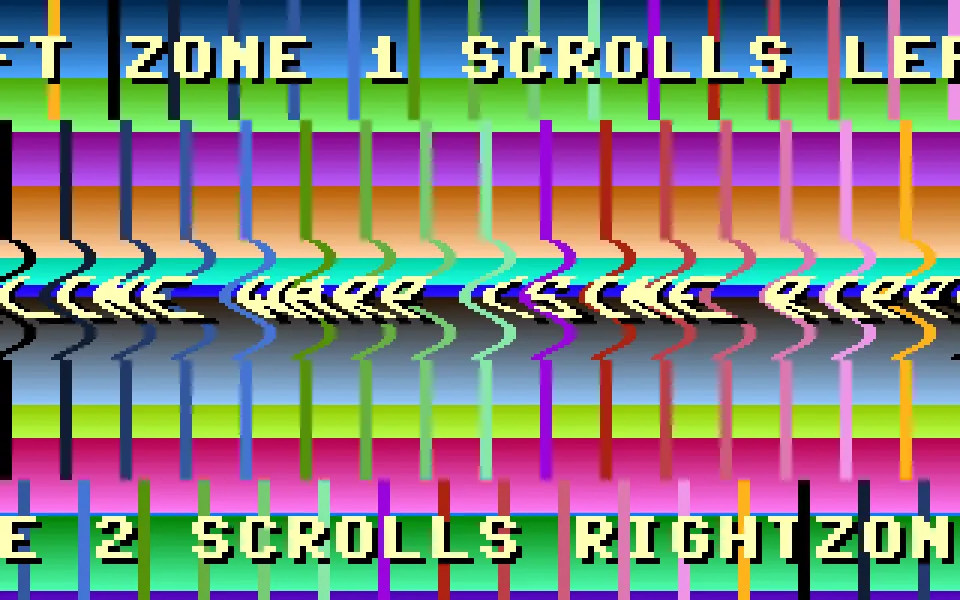
- gfx_scrollzone_demo.bas: three simultaneous scroll layers on one painted bitmap. Top zone pans left, middle band runs a per-scanline sine ripple, bottom zone pans right.
- map_editor.bas: a partial RGC-BASIC port of my old QB64 map editor. Inline rendering, precomputed tile palette. A readable reference for anyone building their own in-game editors.
What’s Next?
My efforts now are going to switch more to tutorials, demos, and games, though I am sure coding these will bring up ideas and gaps in the feature set too. Other than that, what is next?
No, seriously, I am asking – what should I add next? I have a bunch of ideas but I would like to hear from you …
- Multi-voice sound effects?
- Add fonts to
DRAWTEXT? - Textured polygons?
Everything is open source at github.com/omiq/rgc-basic, and everything above can be seen in the browser at ide.retrogamecoders.com.
Enjoy!
Original article by retrogamecoders.com